
Height + Area
[01]
Allowable building height and area, frontage conditions, sprinkler impacts, mezzanine relationships, and construction-type implications.
[ Compliance Analysis ]
Kestrel is the first BIM-native structured compliance data layer for the built environment. It runs inside Revit, checking your design against jurisdiction-specific requirements throughout every phase.
Kestrel Compliance Analysis and Kestrel Compliance Chat are built to work together, so you can go from flagged to fixed in the same check.


Built on official code data via our ICC collaboration. When ICC updates, you get an update.
[ Continuous Compliance ]
Most compliance tools check a static PDF after the design is done. Kestrel checks the live model while you're designing it.
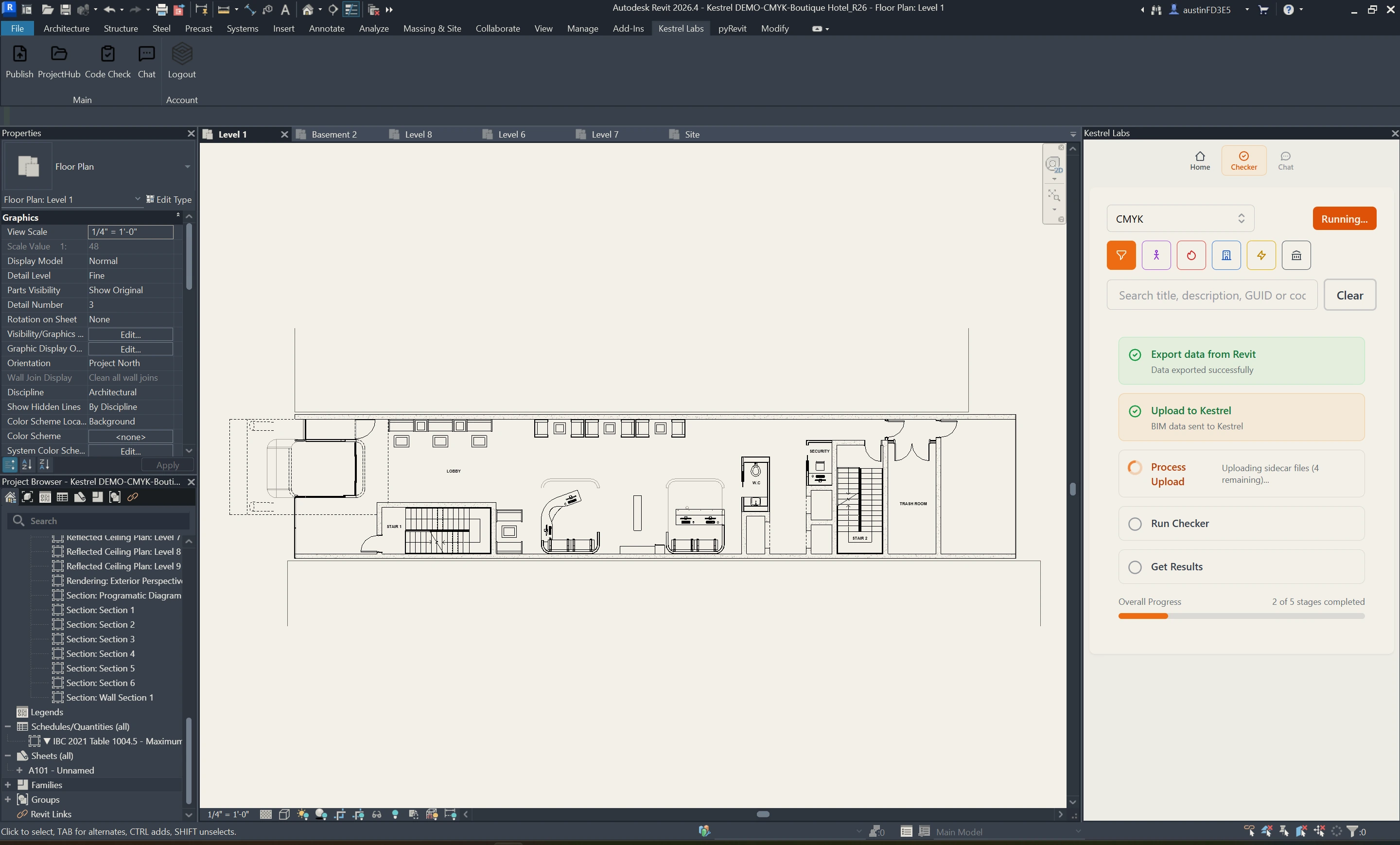
Kestrel translates building code into structured logic applied directly to your BIM model. One click is all it takes.
The earlier issues surface, the less there is to fix.
[ Key Features ]
Every check runs against the live model, with issues mapped directly to the elements involved.
01
Runs in Revit
Kestrel works inside Revit. No exports. No redlines. No switching tools. The check runs on the model you're already in.
02
Right Codes
Kestrel reads your model to determine project type, location, occupancy, and sprinklering, then proposes the applicable codes. You review and confirm before every check.
03
Mapped Issues
Every issue is tied to specific elements in your model. You see exactly what needs attention and where — mapped to your design, not buried in a separate report.
04
Cited References
Each result includes a cited code reference. You see what's wrong and why — with the reference ready when you need to defend a decision to a client or to a jurisdiction.
[ Kestrel // Revit live check ]
Basement 02 · IBC 2024 · Frame 01
Kestrel doesn't replace your judgment. It gives you something worth judging.
[ Coverage ]
Kestrel checks compliance across key regulatory categories, applied in context to your BIM model.
Height + Area
[01]
Allowable building height and area, frontage conditions, sprinkler impacts, mezzanine relationships, and construction-type implications.
Construction Type
[02]
Type I–V classification logic, allowable assemblies, structural fire-resistance assumptions, and construction-related compliance constraints.
Occupancy Classification
[03]
Primary use, mixed-occupancy conditions, occupant load assumptions, control areas, and separation logic between occupancy groups.
Means of Egress
[04]
Required exits, travel distance, dead-end limits, corridor and stair geometry, door clearances, discharge paths, and occupant movement requirements.
Fire + Life Safety
[05]
Fire-resistance ratings, occupancy separations, opening protectives, shafts, smoke-control conditions, and related life-safety requirements.
Accessibility
[06]
Accessibility scoping, accessible routes, turning radii, clear floor space, reach ranges, fixture clearances, and circulation requirements.
Energy + Performance
[07]
Energy-code conditions, envelope performance requirements, lighting and mechanical coordination, and environmental compliance layers.
Site + Environmental
[08]
Wildfire overlays, flood and seismic conditions, hillside constraints, stormwater requirements, and site-specific environmental triggers.
Zoning + Jurisdictional
[09]
Local amendments, overlay districts, planning conditions, density and setback requirements, parking logic, and jurisdiction-specific review conditions.
[ How It Works ]
Kestrel checks your BIM model continuously throughout design — not just once before submission. Issues surface early. You resolve them while there's still room to move.
Identify
[01]
Kestrel reads your BIM model to determine project type, location, occupancy, and sprinklering. It proposes the applicable codes. You review and confirm before anything runs.
Check
[02]
Kestrel runs a compliance check directly on your BIM model, against the requirements for your project type and jurisdiction. About 30 seconds, start to finish.
Map
[03]
Kestrel shows what passes and what doesn't, tied to specific elements in your model. Every issue links to the code behind it. You know exactly what to fix and why.
Track
[04]
Each run is saved to the project history. Run a check after changes. Run another after the next round. Watch violation counts drop as the design takes shape.
[ Built For Teams ]
Designers work inside the model. Project leaders need to know where things stand — without opening Revit.

For Designers
[01]
Run compliance checks directly in your BIM model as you design. Catch issues early. Adjust quickly. Move forward with a clear picture of where you stand. Every violation links back to the element it came from and the code section behind it. The check takes about 30 seconds. Run one as often as your design changes.
Past Analysis Runs
21 total
For PMs + Principals
[02]
Track compliance progress across the project without opening Revit. See violation counts decrease. Understand where issues remain. Confirm readiness before the set goes out. Each run creates a record of progress. You're not reviewing drawings. You're reviewing where the project stands.
[ FAQ ]
The short answers. Reach out if you want the long ones, or anything not here.
[01]
Kestrel is the first BIM-native structured compliance data layer for the built environment. It deterministically checks your BIM model against applicable building code requirements for your project type and location, identifying issues tied to specific elements in your design and linking each one to the relevant code reference.
[02]
Kestrel is built on official code data through our collaboration with the International Code Council (ICC), applied based on your project type and location. We are actively expanding jurisdictional coverage. If you want to confirm coverage for a specific jurisdiction, schedule a demo.
[03]
Both are in development. NFPA 101 (the Life Safety Code) and the International Energy Conservation Code are two of the most referenced standards in architectural practice, and Kestrel recognizes that. We are actively working to incorporate them. When they are available, we will let you know. If coverage matters for a project you have right now, bring it to the demo and we will be straight with you about where things stand.
[04]
No. Kestrel runs a first-pass compliance check to surface issues early, and Kestrel Compliance Chat explains how requirements apply. Final interpretation, professional judgment, and design decisions stay with the architect. Kestrel takes the tedious work off your plate — not the decisions.
[05]
Short answer: As often as your design changes. Kestrel is built for continuous use. Each one-click compliance check takes about 30 seconds. Run one after a design review. Before a client meeting. While testing options. As often as you want to build confidence in your decisions. The earlier issues surface, the easier they are to resolve.
[06]
Yes. Designers run checks inside Revit. Project managers, principals, and project leads review compliance status, violation counts, and progress in the Kestrel portal — no BIM file required. The same check feeds both views.
[07]
Plan review software checks static PDFs after the design is final. Kestrel checks the live BIM model while you're designing it. Catching an egress issue early is a wall you move in five minutes. Catching it at plan review means unwinding everything built on top of it — the corridor, the room layouts, the door schedule, the sheets.
[08]
Kestrel Compliance Chat is an AI building code assistant that answers project-specific code questions using your BIM model, jurisdiction, and applicable regulations. It runs inside Revit or in your browser. Every answer cites the exact code section behind it. Kestrel Compliance Chat and Compliance Analysis work together. The analysis identifies violations. Kestrel Compliance Chat explains the requirement, how it applies, and what changes would resolve it.
[09]
Compliance Analysis runs against your BIM model and surfaces every code issue in your design. Kestrel Compliance Chat answers questions. Ask it why an issue failed, what would fix it, or how a code requirement applies to your specific project conditions. They use the same project data. They solve different problems.